
Why Does Prior Authorization Automation Fail?
Prior authorization automation fails when it handles demo-friendly steps and ignores payer fragmentation, clinical evidence, policy change, exception handling, and workflow integration.
- Last Updated
- May 18, 2026
- Originally Published
- May 18, 2026
- Author
-
 Sohil Bhagat
Chief Product Officer, Kairos Health
Sohil Bhagat
Chief Product Officer, Kairos Health
This page is part of our PA Automation Complete Guide. Start there for the full workflow; this deep dive covers what goes wrong when vendors cut corners on that workflow.
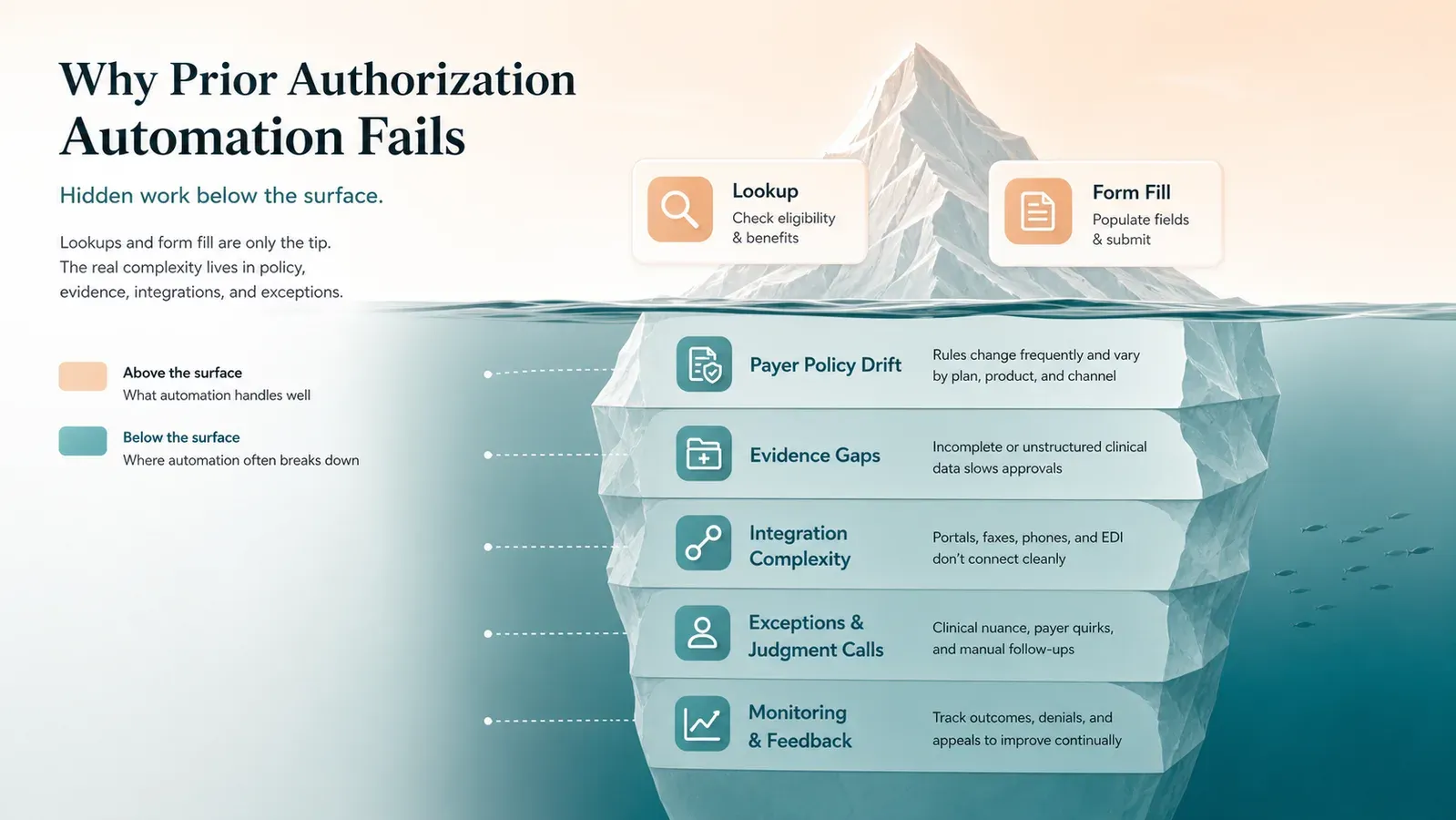
Most PA automation fails because it automates the easy parts and leaves the operational work to the practice. Requirement lookup and form submission look good in a demo. Payer fragmentation, unstructured clinical evidence, vague policy language, mid-year policy changes, post-approval invalidation, and staff workflow integration decide whether denials move. CAQH’s 2024 Index shows why point automation falls short: only 43% of medical prior authorizations used end-to-end electronic channels in 2024, while 35% still used portals or IVR and 22% were manual.
If your PA automation reduced submission time but left denials unchanged, look for these patterns before you switch vendors.
Overview
Visible in demo
Requirement lookup, form fill, basic submission, and status check.
Denial prevention lives below the demo layer.
Payer rules
Versioned policy changes, specialty routing, and effective dates.
Evidence quality
Chart extraction, medical-necessity criteria, and attachments.
Channel coverage
Portal, fax, phone, EDI, payer APIs, and long-tail workflows.
Workflow integration
Write-back, exception routing, monitoring, and post-approval drift.
Key takeaways
- The “PA iceberg” is real. Surface automation (lookup, form-fill, status) does not address the portal, IVR, phone, fax, mail, and email work still present in medical PA.
- 12 recurring failure patterns explain most outcomes. Bad workflow trigger and no production feedback loop are the top two.
- Policy change breaks stale systems. Payers publish effective-dated lists and warn that requirements change.
- Policy changes can affect active care plans. Requirement checks need the payer policy version that applies to the date of service, not just today’s cached list.
- EHR write-back is not always required on day one, but it becomes critical at scale. Without it, teams may still save time on submission, but lose efficiency to manual updates and follow-up coordination.
- Post-approval monitoring is rare and important. Approvals get invalidated, and most tools do not notice.
- Ask how the vendor will handle your payer mix after launch. A demo is useful, but the rollout plan determines whether automation survives real workflow variance.
What is the “PA iceberg”?
The PA iceberg is the gap between what automation demos show and what denial prevention requires. Lookup, form-fill, and status checks are visible; payer-rule maintenance, evidence quality, channel coverage, write-back, and human escalation sit below the surface.
Most PA automation demos follow the same shape: requirement lookup, form population, status tracking, clean interface, compelling ROI. Six months later, the team still touches most cases by hand and approval rates have not moved.
The demo shows the surface of the work. Denial rates move when the system handles payer knowledge, unstructured-data reasoning, and adaptation to policy change. CAQH found medical PA split across end-to-end electronic, portal/IVR, and manual modes, and AMA guidance describes standard transactions, payer portals, fax, telephone, and follow-up as live PA methods. A form-filling demo does not prove the system can operate across that workflow.
The test is not whether the system can fill the form. The test is whether every answer is traceable. The workflow should cite the relevant payer policy, map each medical-necessity criterion to evidence in the chart, and make every generated answer reviewable at a click. Without that, automation may only make the submission faster, not safer or more likely to be approved.
Why Automation Fails
Why does prior authorization automation fail? 12 patterns
Prior authorization automation fails in recurring patterns: late workflow triggers, weak integration, generic payer rules, no write-back, poor escalation, stale policy data, no post-approval monitoring, narrow channel coverage, weak evidence quality, no production feedback loop, vague criteria, and fragmented tools.
1. Bad workflow trigger
PA starts too late, after scheduling and sometimes after arrival. The team has no time for peer-to-peer, missing documentation, or clean rescheduling. Automation bolted onto a late trigger inherits the lateness.
Fix: Trigger the PA workflow from the BV-to-PA handoff or scheduling, before the patient lands on the calendar. Even better if the PA workflow is triggered on clinical note entry by the physician.
2. Weak EHR integration
Most PA tools run as standalone systems. Staff have to open a separate system, pull clinical details from the EHR, attach supporting records manually, submit through the vendor, and then track status in another worklist. That may improve form completion, but it does not fix the underlying data-flow problem.
Fix: Require deep EHR integration with bidirectional data flow. For PA automation to materially reduce misses, it needs to stay close to the source of truth: orders, diagnoses, notes, medication history, imaging, labs, treatment plans, and scheduling context. Otherwise, teams still risk incomplete submissions, missed authorizations, stale status updates, and avoidable follow-up work.
3. Generic payer rules, no specialty nuance
Payer logic varies by specialty. A rheumatology infusion has step-therapy and site-of-care logic a generic engine misses. Oncology J-codes can route to specialty reviewers by diagnosis, and commercial lists can vary by CPT, state, site of service, and program. Public payer requirement documents, such as UHC’s PA requirements and BCBSMT’s Specialty Rx rules, make the point clear: generic payer logic breaks quickly when specialty context matters.
Fix: Use specialty-specific rule sets, not one-size-fits-all payer logic. The workflow should identify the relevant payer, plan, service, diagnosis, site of care, benefit type, and policy version before deciding where and how to submit.
4. No write-back
The PA reference number, status, and determination must land back in the EHR, scheduling, and billing systems. Automation that completes the PA without writing back leaves staff retyping, which means staff still review every case.
Fix: Write the authorization reference number, status, and determination back to every downstream system.
5. No escalation path
Real PA automation produces a steady stream of ambiguous cases. A tool that handles the happy path dumps every exception on staff without context. Public baselines show why context matters: CAQH reports 16- to 24-minute PA transactions depending on channel, and a prospective specialty-clinic study found a median 30 minutes per PA.
Fix: Surface exceptions with evidence pre-assembled so staff review the disputed facts instead of rebuilding the case. (CAQH 2024 Index, specialty-clinic PA study)
6. No handling of payer policy change
Payer PA requirements can change while a patient is already in a course of care. In 2026, Humana’s South Carolina Medicaid SRT policy listed a March 9 effective date for superficial radiation therapy codes 77436-77439 and excluded image-guided SRT. Highmark Blue Cross Blue Shield’s FEP update moved selected oncology drugs, including Keytruda and Opdivo, from post-service review to pre-service prior authorization effective February 1, 2026.
A static rule set can be right for one date of service and wrong for the next.
Fix: Monitor payer policies with effective dates, and keep prior versions available for audits and appeals. (Humana SRT policy, Highmark BCBS FEP update)
7. No post-approval monitoring
Getting the authorization is half the battle. A CPT code change, date shift, site-of-service modification, or scheduling conflict can invalidate an approval and surface at claim denial. Most automation stops at submission.
Fix: Monitor authorizations for invalidating events and pull cases back into workflow.
8. Narrow channel coverage
Some tools automate EDI 278. Others cover the top three portals. CAQH’s 2024 Index shows the channel problem: 43% of medical PAs used end-to-end electronic channels, 35% used portal or IVR, and 22% were manual by phone, fax, mail, or email. A tool that covers one channel leaves the rest of the work manual.
Fix: Cover portal, fax, phone, and 278 workflows, measured against your payer mix.
9. Submission speed without evidence quality
Teams can submit forms fast. Submitting a form the payer will approve is a different problem. Generic automation bundles whatever it can access and hopes the packet is sufficient. Faster submission of under-documented PAs accelerates denials.
Fix: Run a pre-submission evidence check against payer policy; escalate when documentation is missing or ambiguous.
10. No production feedback loop
If the vendor cannot explain how real reviewer feedback updates payer-policy mappings, documentation playbooks, portal scripts, and exception routing, the system will drift. A demo can show the happy path; the feedback loop determines whether the workflow improves after launch.
Fix: Require a Production Alignment Ramp with human-review points and structured change capture.
11. Vague medical-necessity language
Policies reference “recent imaging,” “failed conservative therapy,” and “appropriate diagnosis codes” without defining recent, failed, or appropriate. A rule engine cannot parse that.
Fix: Use LLM-based reasoning over policy text and clinical evidence, with citations. Use rules where policy is crisp; use AI where it is not. Use human judgment where AI confidence is low.
12. Tool fragmentation
A significant fraction of “PA automation” runs inside a single payer portal, transaction type, or specialty pathway. The practice ends up with multiple tools, each covering a slice, each with its own login and reconciliation. Ask whether the vendor connects requirement check, evidence, submission channel, status, write-back, and exception queue in one workflow.
Fix: Require one workflow across payers rather than stitched-together point solutions.
Evaluation Framework
How should you evaluate whether automation will work for you?
Evaluate PA automation against your failure modes. A clean demo case proves little by itself. The bar is a credible rollout plan, write-back, exception context, payer-policy monitoring, channel coverage, and post-approval monitoring against your payer mix.
Data
Payer identity, codes, documentation, and member context.
Workflow
Late triggers, no monitoring, and disconnected queues.
Payer policy
Stale rules, specialty nuance, and changing criteria.
Integration
No write-back, tool sprawl, and manual reconciliation.
Human review
Weak escalation, missing evidence, and no feedback loop.
Five questions to ask any vendor before committing:
| Question | Green flag | Red flag |
|---|---|---|
| Launch plan for my top payer-service combinations? | Prioritized rollout with human-review points and feedback capture | Generic demo with no deployment path |
| How do you detect and handle payer policy change? | Continuous monitoring, change alerts | “Our team refreshes every quarter” |
| Channel coverage for my payer mix? | Portal + fax + phone + 278, mapped to your payers | “We support the major payers” |
| What happens to cases automation can’t handle? | Escalation with evidence pre-assembled | “Routed to a queue for manual review” |
| Do you monitor post-approval invalidation? | Yes, with automated pull-back into workflow | “We stop at approval” |
Check two things yourself:
- Does automation write results back to the EHR and scheduling system? If staff still retype the reference number, the time savings remain theoretical.
- How does the vendor run the Production Alignment Ramp? The answer should name human review, feedback capture, payer-policy mappings, documentation playbooks, exception routing, and expansion across payer-service patterns.
Kairos POV
Production feedback is the moat. New payer-service combinations should start with human review, structured feedback capture, and clear expansion criteria. The Production Alignment Ramp is where the system learns the customer’s payer mix, documentation patterns, policy edge cases, and escalation paths before more work moves to exception-based review.
Treat policy change as a platform responsibility. Payer policy should be versioned with effective dates, not buried in static rules or quarterly refreshes. The system needs to answer today’s requirement check and also reconstruct yesterday’s answer for appeals, audits, and post-denial review.
Submission speed does not fix weak evidence. Kairos’s operating view is that the PA packet should be checked against payer policy before filing. Missing or ambiguous documentation should route to human review with the relevant policy criteria and patient evidence already assembled.
Bottom line
PA automation failures come from architecture and workflow design. They follow a short list of recurring patterns, and most of those patterns are fixable with the right evaluation criteria. Automation can reduce avoidable denials when it handles the work that does not show up in the demo.
FAQs
My PA automation is reducing submission time but not denials. What should I fix first?
Check whether medical-necessity documentation is compared against payer criteria before submission. Faster submission of under-documented PAs accelerates denials. A system that runs pre-submission evidence checks and escalates when documentation falls short should be measured against denial outcomes over a defined pilot window.
Can rule-based automation work, or do I need AI?
Rule-based works where policy is crisp. It fails where policy is vague ("recent imaging," "failed conservative therapy") or inputs are unstructured. Most real workflows mix both, so the right system mixes both.
How much of PA can be automated today?
The repeatable, administrative parts are the best automation targets. Novel drug requests, peer-to-peer reviews, substantive appeals, and ambiguous clinical documentation should stay human-led with automation pre-assembling the case context.
How fast should payer rules be refreshed?
Top payer rules need active monitoring because PA lists are effective-dated and payers warn that requirements change. The exact cadence should be based on payer mix, but static lists refreshed every quarter are risky.
What's the minimum bar for a vendor to take seriously?
A launch plan for your payer-service mix, a Production Alignment Ramp with human-review points, write-back to your EHR and scheduling, exception handling with pre-assembled context, active payer-policy refresh, and post-approval monitoring. Any missing piece is a predictable failure mode.